
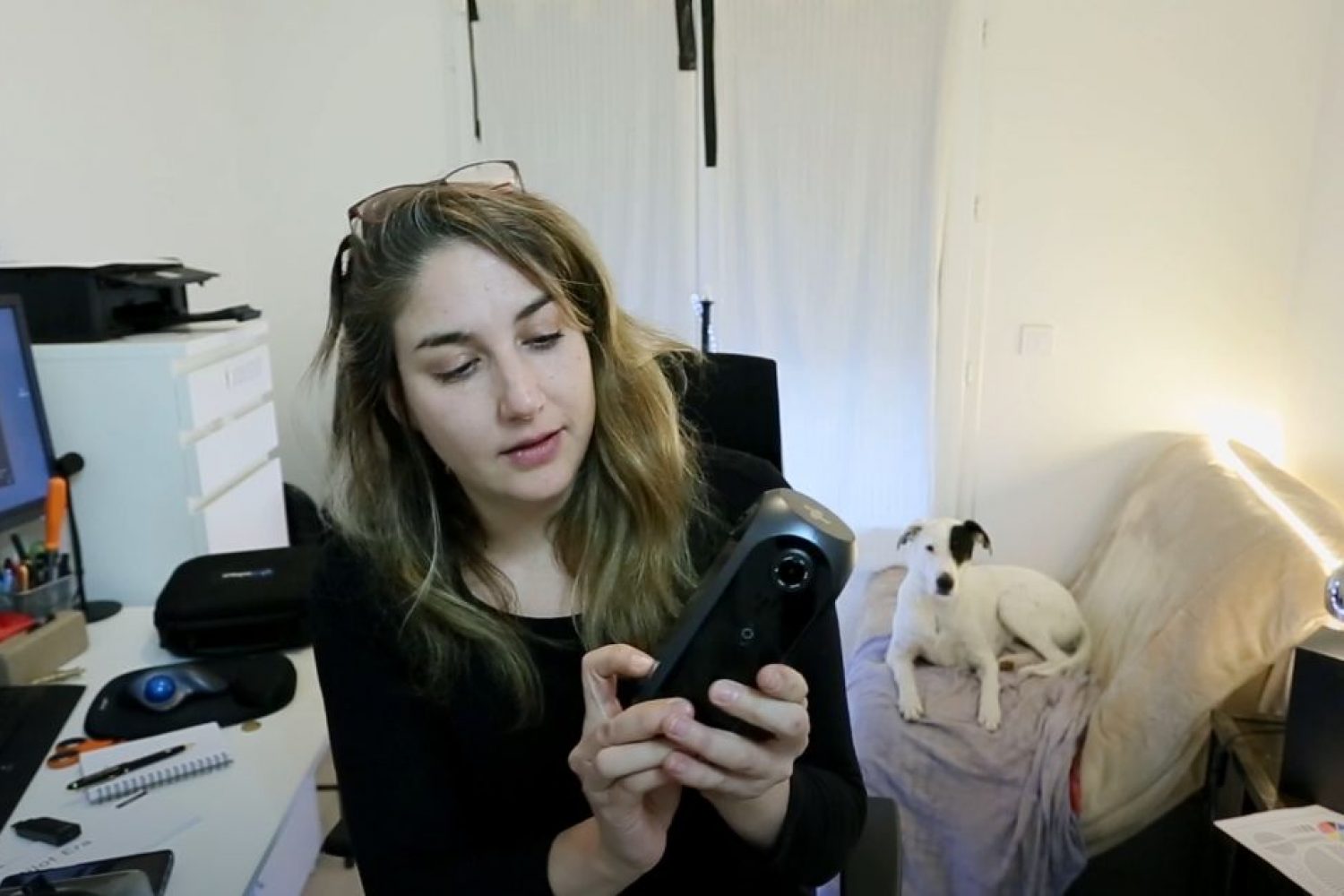
Pilot Era 360 camera review: Back in 2019, I had the opportunity to put this innovative 8K all-in-one camera through a series of real-world tests. From stitching and stabilization to low-light performance and professional VR workflows, this hands-on review explores what the Pilot Era could actually deliver in production conditions.
Developed by Pisofttech, later known as Labpano, the Pilot Era was an interesting step in the evolution of professional 360° cameras. Although it is now an older-generation camera, my original video tutorial and technical observations remain useful for understanding the development of immersive imaging technology.
Instead of simply looking at the specifications, I wanted to see what happened when the Pilot Era was actually used in real shooting conditions.
So I took it outside.
I tested different resolutions, frame rates, lighting conditions, static shots, camera movement, stitching and audio — and created a complete video tutorial and a series of 360° samples.
2026 Update: Why Keep a 2019 Camera Test Online?
360° camera technology moves extremely fast.
Cameras appear, firmware changes, companies evolve, new models arrive and sometimes an innovative feature that looked experimental suddenly becomes completely normal a few years later.
That is precisely why I decided to keep this Pilot Era 360 camera review online.
The Pilot Era is now an older-generation camera, and availability and technical support may vary. However, the test remains an interesting snapshot of the development of professional all-in-one 360° cameras.
More importantly, the methodology behind the test remains exactly the same today:
What does the camera actually do once you take it out of the box and use it on a real production?
Specifications are useful.
Real footage is better.
Pilot Era 360 Camera Review: The Original 2019 Test
When I tested the Pilot Era, one of its most interesting characteristics was its all-in-one workflow.
The camera combined four lenses with a built-in touchscreen, internal storage and in-camera stitching.
That meant that it was possible to:
- preview the 360° image directly on the camera;
- record stitched or unstitched video;
- process 360° footage inside the camera;
- create an automatic nadir patch;
- work without constantly connecting the camera to a computer;
- and use the camera for 360° live-streaming workflows.
Today, seeing a screen on a compact 360° camera may not sound revolutionary.
In 2019, it was much more unusual.
Watch My Pilot Era 360° Camera Tutorial
In the video below, I go through the camera interface, shooting modes and settings and show footage recorded during my tests.
Rather than making a controlled studio demonstration, I wanted to test the camera in conditions closer to the way I evaluate equipment for an actual VR or 360° production.
How I Tested the Pilot Era
I recorded 360° footage in several environments and deliberately changed the shooting conditions.
The tests included:
- different lighting conditions;
- daylight and darker environments;
- static camera positions;
- movement;
- different recording resolutions;
- stitched and unstitched recording;
- different frame-rate settings;
- internal camera audio;
- stabilization;
- and the complete shooting-to-post-production workflow.
For comparison, the sequences used in my original test were placed on a 4096 × 2048 / 29.97 fps editing timeline.
The unstitched footage was processed using the stitching tools available for the camera at the time.
The important thing for me was not to make every image look perfect.
It was to let viewers see what the camera was actually producing.
Image Quality and Dynamic Range
In this Pilot Era 360 camera review, image processing and colour flexibility were important parts of my evaluation.
One of the first things I noticed when transferring the footage to my workstation was the relatively strong contrast and saturation applied to the image.
With the firmware available during my test, there was no flat or logarithmic recording profile offering the kind of latitude I would normally want for more advanced colour grading.
That became particularly visible in scenes with a large difference between highlights and shadows.
For quick delivery or direct stitching, the processed image could be convenient.
For professional post-production, however, I would have preferred greater control over the original image.
This distinction is still important when I test cameras today.
A camera can produce an attractive image straight out of the device while still giving a professional operator too little flexibility in post-production.
Those are two completely different questions.
Low-Light Performance
Low-light performance was another important aspect of my Pilot Era 360 camera review:
Low-light recording was one of the Pilot Era’s weaknesses during my 2019 tests.
In very dark environments, increasing exposure compensation did not recover enough usable information from the shadows, and the image could become extremely dark.
You can see an example towards the end of my original test video.
Again, this is exactly why I like testing cameras outside ideal demonstration conditions.
Almost every camera looks impressive in good daylight.
The more interesting question is what happens when the light becomes difficult.
8K, 6K and Some Very Unusual Frame Rates
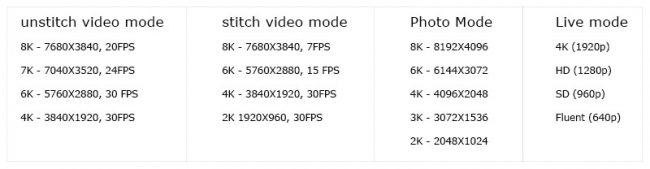
The Pilot Era offered several resolution and stitching combinations.
On the firmware version available during my original test, some of the higher-resolution modes produced unusual frame rates.
For example, I tested an unstitched mode close to 8K at approximately 20 fps, while some internally stitched modes operated at even lower frame rates.
I also encountered situations where the recorded frame rate did not exactly correspond to the number displayed in the camera interface.
That matters in professional production.
Non-standard frame rates can require footage to be interpreted or conformed during post-production, particularly when it needs to be combined with footage and externally recorded audio using standard production frame rates.
Later firmware versions changed some of the Pilot Era’s recording capabilities, so these observations should be understood specifically as the results of my 2019 hands-on test rather than as specifications for every version of the camera.
Audio
The camera could record audio internally, but for professional production I recommended using a separate audio recorder.
This is something I still consider extremely important when evaluating immersive cameras.
Image quality tends to receive most of the attention in VR demonstrations, while sound is sometimes treated as an afterthought.
For an immersive production, audio deserves exactly the opposite.
Heat and Long Recording Sessions
During this Pilot Era 360 camera review, I also paid attention to heat management and recording stability.
One thing that impressed me during the original test was the camera’s ability to process relatively high-resolution 360° footage internally without becoming excessively hot during longer recording sessions.
Processing and stitching multiple video streams inside a compact camera requires considerable computing power.
In 2019, seeing that amount of processing taking place inside a relatively small standalone camera was particularly interesting.
Pilot Era Updates I Tested in 2019
The camera continued evolving during the period when I was testing it.
Among the updates I noted in July 2019 were:
- the addition of a Time Lapse mode;
- improvements to the firmware and 4K stitching.
This is another reason equipment reviews need dates.
With cameras that depend heavily on software, the product you test in January may behave quite differently six months later.
What the Pilot Era Got Right
Looking back at this camera several years later is interesting because many of its ideas have become increasingly familiar in modern 360° equipment.
The Pilot Era was already exploring a workflow based around:
camera → preview → stabilization → stitching → finished 360° image
without requiring a large external computer system for every step.
For documentary work, industrial applications, virtual tours, live streaming and fast immersive production, simplifying this workflow has enormous value.
Not every part of the implementation was perfect, but the direction was clearly important.
Why I Test Cameras Differently as a VR Producer
I have been working with 360° photography, immersive video and VR production since 2009.
When I test a camera or piece of immersive equipment, I am therefore not only interested in specifications or whether a feature works for five minutes.
I want to understand how it fits into a complete professional workflow.
That includes questions such as:
How quickly can the equipment be deployed?
How reliable is it during a real shoot?
How does it react to difficult lighting?
What happens around stitching zones?
How stable is the image when the camera moves?
How much control do I have over exposure and colour?
Can the material survive professional post-production?
How is the audio handled?
How long can the system record?
How easily can the material be viewed in a headset or integrated into a VR experience?
And most importantly:
Would I trust this equipment on a real production?
Those are the questions that interest me much more than simply repeating the specification sheet.
Professional 360° Camera and VR Equipment Testing
I continue to be interested in testing new cameras, immersive imaging systems, VR equipment and professional 360° production tools.
I can provide manufacturers and technology companies with hands-on testing based on real production workflows, including:
- 360° and VR camera field tests;
- image-quality and low-light evaluation;
- stitching and stabilization tests;
- professional workflow testing;
- camera movement and drone-related workflows where appropriate;
- headset and immersive playback evaluation;
- post-production and stitching workflow tests;
- technical feedback during product development;
- pre-release or beta testing;
- tutorial and demonstration videos;
- real-world sample footage;
- and technical articles for professional audiences.
With more than 15 years working in immersive production, my interest is not simply in whether a product works.
It is in discovering where it works, where it doesn’t, and how it can become useful in a real professional production environment.
Developing a new 360°, VR or immersive imaging product?
If your company is developing a 360° camera, VR camera, immersive capture system, headset, production accessory or software tool, I am open to testing new equipment and technologies.
For product evaluation, professional testing, technical feedback, tutorial content or collaboration, feel free to contact me through Visual Solutions 360°.
Looking for an Experienced 360° Camera and VR Equipment Tester?
I have been working in professional 360° imaging and immersive production since 2009, testing cameras, stitching software, VR headsets and production workflows across a wide range of real-world projects.
I welcome collaborations with camera manufacturers, VR technology developers and professional equipment brands interested in independent field testing, technical feedback, product tutorials and real-world demonstrations.
Developing a new camera or immersive technology? Get in touch with Visual Solutions 360°.
Related Camera Test
You can also discover my hands-on review of the QooCam 360° / 3D-180 all-in-one camera, another camera I tested during this period of rapid development in compact immersive capture systems.